Why you need a machine that never sleeps
A note I type on my phone at a bus stop becomes a commit in a git repository a few minutes later, with every one of my devices asleep. It took a server costing about $10 a month to make that sentence true, and the same server fixed a second problem I had filed as unrelated. To see why either problem needed a server at all, start with what the setup looked like before.
The setup before
My personal computing runs on two tasks: writing code and taking technical notes. The notes have lived in Obsidian1 since 2021 — a note-taking app whose “vault” is nothing more than a folder of plain Markdown files on your own disk. The code goes through Claude Code,2 in the long-running agent-session style I described in an earlier article — and lately Claude Code has been becoming the interface to the notes as well, reading the vault and writing pages back into it. The code itself lives on GitHub: private repositories whose pushes to a project’s main branch deploy through their pipelines.
Both halves of that stack have mobile equivalents, and they are what let me work away from the desk. Obsidian on the iPhone captures notes anywhere, with Obsidian Sync3 merging edits between phone and notebook; the Claude app pairs with the notebook’s agent sessions through Remote Control,4 relayed by Claude’s cloud, so I could follow a session and answer it from wherever I was. The GitHub app closes the loop on the code side, tracking pull requests and deploys from the same pocket.
The catch is that every one of those conveniences ended at the notebook — WSL inside Windows, holding the development environment, the agent sessions, and the desktop Obsidian client. It was the center of everything, and none of the rest could do anything unless it was open.
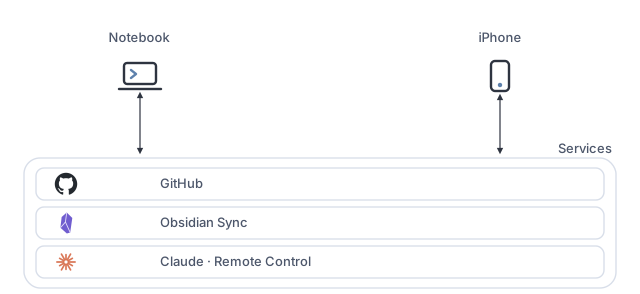
In tools, the whole thing was short:
- Notebook
- WSL: a Linux environment inside Windows, where the projects and their development toolchain live.
- git: version control for the projects, pushing to GitHub.
- Claude Code: the coding agent; the long-running sessions are terminal sessions of it.
- Obsidian: the desktop client, the vault’s main reading and writing surface.
- iPhone
- Obsidian: the mobile client, where notes get captured on the go.
- Claude app: paired to the notebook’s sessions through Remote Control — it shows what an agent is doing and lets me answer it from anywhere.
- GitHub app: pull requests and deploys, tracked on the go.
- Services
- GitHub: where the code lives — repositories, pull requests, and the deploy pipelines.
- Obsidian Sync: the official sync service, merging note edits between the two devices end to end.
- Claude: the model the agent sessions run against; its cloud is also what relays Remote Control between the app and the sessions.
The first problem was the knowledge base. For most of that time, the pattern was manual at both ends: I wrote the notes by hand and retrieved them by hand, through search, backlinks, and opening one note to find the next. What changed recently is not the notes but the interface to them. I have been reshaping the vault along the lines of Andrej Karpathy’s LLM wiki spec:5 raw sources stay immutable in their own layer, a wiki of interlinked pages sits on top of them, and the model does the writing and the bookkeeping — “you never (or rarely) write the wiki yourself.” Retrieval stops being a search and becomes a question, and a good answer gets filed back as a new page instead of scrolling out of a chat window.
That shift changes what the vault needs from the machine underneath it. A manual vault only has to be open when I am reading it. A vault whose main reader and writer is a model needs something to run that model against it: ingesting sources, updating the pages a new note touches, checking for contradictions and orphans. None of that happens on a laptop that spends the day closed.
Obsidian Sync keeps the vault consistent across my devices, but sync only happens between clients that are running — and with exactly two clients, the vault converged only in the windows when notebook and phone happened to be awake together. Close the notebook, pocket the phone, and the vault stops converging; it exists as a coherent whole only in those moments of overlap. Three consequences follow. There is no continuous history — Sync keeps version snapshots, but nothing like a commit log. There is no backup outside the sync system itself. And, the one that now mattered most, there is no way for anything else to read the vault: the assistant the new pattern depends on has no vault to look at unless one of my devices is open.
The second problem looked unrelated. The agent sessions ran in that same WSL environment, and, as the mobile half of the workflow already existed, what was missing was not a way to reach them — it was a machine for the sessions to live on. They died with the notebook lid. An agent halfway through a task holds context that took real time to build: the plan, the files it has read, the dead ends already ruled out. Close the lid to leave the house and all of it is gone, to be reconstructed the next time the notebook opens. This was the failure that actually hurt, and it kept striking at exactly the wrong moment, because leaving is the point — the value of a long-running session is that it makes progress while I am elsewhere, and being elsewhere was precisely what killed it. The phone could drive a session from anywhere, but only while the notebook sat at home, awake, with its lid open. Remote control of a sleeping machine is remote control of nothing.
Both problems are the same problem. The vault needs a peer that is always online; the projects need a session that never closes. Neither needs the machine to be large. And neither is a problem with the services: those were already doing their jobs around the clock. What was missing was a machine of mine standing on them that never sleeps.
One small server, two jobs
The answer is a small cloud VPS at Hetzner6 — a few cores, a few gigabytes of RAM — running Ubuntu and doing both jobs at once. That $10 buys the machine and nothing else: the assistant subscription that makes any of it useful is a separate line item, and a larger one. Anyone pricing this should count both.
Two requirements shaped the machine, and each has a provider. It must be always on: Hetzner supplies that — a rented box with no lid to close. And it must be private — safe from the internet and reachable only from my own devices: Tailscale7 supplies that. Tailscale is a mesh VPN: every machine running it joins one flat, private, encrypted network, wherever it happens to be, and my devices and the server all run it. The mesh is the dotted boundary in the figure below.
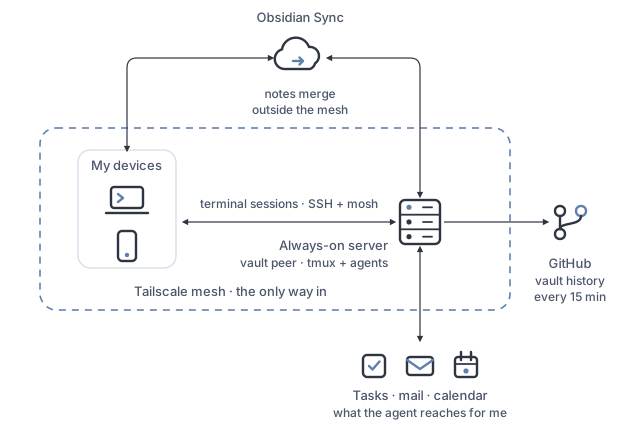
What this stage adds, in tools:
- Notebook — everything it already had, plus:
- Tailscale: joins the mesh from inside WSL.
- Server — the new machine, running:
- Ubuntu: the operating system, on a Hetzner cx33.
- Tailscale: the mesh’s always-on node.
- OpenSSH + mosh:8 the way in over the mesh.
- tmux:9 one long-lived terminal session per project.
- Claude Code: the agents’ new home.
- Obsidian’s headless sync client:10 the vault’s resident peer.
- git: with the fifteen-minute timer committing the vault and pushing its history to GitHub.
- iPhone — everything it already had, plus:
- Tailscale: puts the phone on the mesh.
- Blink Shell:11 a terminal for iOS, for dropping into any session over the mesh.
The defining property of the setup is that the server is dark to the internet. The cloud firewall is default-deny inbound; the only thing allowed through is Tailscale’s UDP port, carrying the mesh. SSH exists only inside that mesh, so there is no public port to find, scan, or brute-force. If the mesh ever fails, the provider’s web console is the out-of-band way back in.
The vault gets a resident peer
The server joins the same Obsidian Sync mesh as my devices — headlessly, via Obsidian’s official command-line client, running as a system service that survives reboots and needs no session attached. From the vault’s point of view it is just another device, one that never sleeps. Any two devices now sync through a peer that is always online.
Then the server takes on a job my devices could have done, but only badly:
putting the vault under version control. Nothing stops a notebook from running
git over a folder of Markdown files — but a machine that sleeps writes a
history full of holes, committing only when it happens to be open. A machine
that never sleeps can keep the clock: every fifteen minutes a timer commits
whatever changed and pushes to a private GitHub repository. That is the
bus-stop sentence from the top of this piece, and this timer is what makes it
true. It is worth being
precise about what that history is and is not — the commits are machine-made on
a clock, with no messages worth reading, so git log here is not a narrative of
how my thinking evolved. It is a backup that can be rewound to any fifteen-minute
slice, which is a more modest thing. The two layers stay cleanly separated:
Obsidian Sync handles multi-device merging of notes, git handles history and
backup. And because the server is the only machine that ever commits, merge
conflicts are impossible by construction. One writer, no races.
The vault also becomes something an agent can work with, which is what the wiki pattern was asking for all along. An agent on the server can read the notes, answer from them, and file what it learns back as new pages at any hour. In practice this is on demand rather than automatic: the wiki operations live in dedicated skills12 — packaged instructions an agent loads when they are relevant — and I invoke them when I have sources to ingest or want the pages tidied. A timer that does the upkeep unattended is the obvious next step, and does not exist yet.
One boundary was drawn before any of this went live: a private folder of the
vault never reaches the server at all, and is excluded a second time in
.gitignore so it could not reach GitHub even if the sync configuration
regressed. The cost is that this folder is recoverable only from my devices and
Sync’s own version history.
Projects get a place that never closes
The second job is hosting the development sessions themselves. The structure is deliberately old-fashioned: tmux, with one long-lived session per project, each running a coding agent. On top of SSH sits mosh, which keeps the connection alive across network switches — walk out of Wi-Fi coverage mid-session and the terminal is still there when the phone picks up cellular.
The phone is the part that changes the experience. Blink Shell over the mesh gets me into any session from anywhere, and Claude Code’s Remote Control pairing — the same one that used to reach the notebook — makes the phone a first-class client: sessions push a notification when the agent finishes or needs a decision, and I can read the result and answer from wherever I am. The difference is what sits on the other end of it now: a session that is always still there. There is no web IDE in this setup, and that is not an omission. An agent-driven workflow is what makes a phone a usable development client at all, because the work you do from a phone is reading, deciding, and directing, none of which needs an editor.
Nothing else moved to the server. Pushes to a project’s main branch still deploy through the same pipelines as before, and the server holds no deployment credentials.
What the plan didn’t survive
The design was written in one sitting, and execution corrected it in several places.
The location changed at the checkout page. The original plan chose a US datacenter for lower latency. Between planning and provisioning, Hetzner’s mid-2026 price adjustment left US locations several times the price of European ones, which inverted the decision. The European server adds real round-trip latency and it turns out not to matter: mosh’s local echo hides it while typing, and an agent-driven workflow is not latency-sensitive. You send intent and read results, and the milliseconds in between are lost inside the model’s thinking time anyway.
The fancy option lost to the boring one. Tailscale ships its own SSH, where the mesh itself authenticates you. It would have been one less thing to configure, but it breaks mosh, whose bootstrap needs a real SSH daemon on the other end. Plain OpenSSH over the mesh won. Relatedly, fail2ban — reflexive on any public server — was skipped, because with no public SSH there is nothing for it to protect.
The backup plan is that there is almost nothing to back up. Code re-clones from GitHub, the vault re-syncs from Obsidian Sync, and everything of value exists redundantly off the box, so a single manual snapshot replaced the provider’s paid automated backups. That covers losing the machine. It says nothing about someone else gaining it, and the box does hold things worth stealing: a mesh key, sync credentials, write access to the repository that holds my entire knowledge base, and — once the integrations landed — OAuth tokens for three more services. Near-stateless is a claim about recovery, not about confidentiality. Confidentiality is the job the closed front door does.
The first version of the auto-commit script had a quiet bug. It exited early when nothing had changed, which meant a failed push would strand its commits not until the next timer tick but until the next content change. The fix is a one-liner: push unconditionally, so the cheap redundant operation un-strands the failed expensive one.
The private-folder exclusion was tested by proving the positive first. The initial full sync ran unrestricted, confirming the private folder did land on the server — proof the pipeline could carry it. Only then was the exclusion enabled, the folder removed, and the negative verified from both directions: it never reappeared, and a fresh file created in it on the desktop never arrived, even transiently. A test that something never happens is only convincing after you have watched it happen.
The agents run without approval prompts. Each session runs with permission
checks disabled — an explicit decision, not a default. On my notebook an agent
asks before touching anything consequential; on the server, waiting for approval
would defeat the purpose of sessions that make progress while I am away. What
made that defensible was that the work they did there was recoverable work: the
vault and the code are both under version control, so a bad agent action is a
git revert rather than a loss. Autonomy came after the blast radius was made
small, in that order.
The jobs I didn’t plan for
Once a machine is always on and already running an agent, you start asking it for things that have nothing to do with code. The sessions on the server now reach my task manager, my mail, and my calendar through MCP — the Model Context Protocol, an open standard for connecting an assistant to an external system.13 The agent on the box is the client; Todoist, Gmail, and Google Calendar each expose an MCP server on their side, and the sessions connect out to them. Mail is deliberately scoped to reading and drafting; the agent cannot send on my behalf.
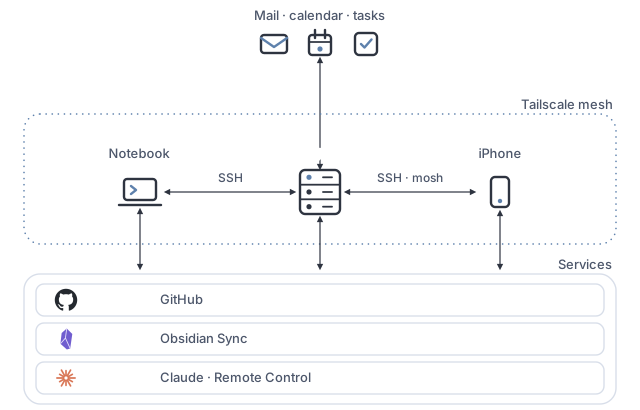
The only new software in this stage:
- Server
- MCP connections: out to Todoist, Gmail, and Google Calendar — their MCP servers live on their side; the agent is the client.
- Anki sync server:14 the official headless server, keeping my flashcard collection on the box.
- Health receiver: a mesh-only endpoint collecting what the phone measures.
- iPhone
- AnkiMobile: the flashcards, syncing against the server.
- Health Auto Export:15 pushes Apple Health data to the server.
What that adds is not really automation; it is adjacency. Notes, tasks, mail, and calendar are the four places my week actually lives, and they were four apps I switched between, holding the connections between them in my head. An agent that reaches all four can hold them instead: find the mail thread that explains why a task exists, check what is due against what the calendar says the day can actually hold, draft the reply, file the follow-up, and write the result into the vault it already syncs.
In practice this is ad-hoc rather than scheduled. I ask it things in passing, from the phone: move this meeting and tell me what it collides with, find what someone said about this last month, turn that thread into a task with the right date on it. It works while I am doing something else, and the notification when it finishes arrives on the same channel as the coding sessions. There is no morning digest and nothing running on a cron — just something I can ask at the moment I would otherwise be making a mental note to deal with it later.
Not every unplanned job dials out, either. The server now also hosts services of its own, visible only inside the mesh. An Anki sync server — Anki is the spaced-repetition flashcard app — keeps my collection on the box, where an agent can draft and manage cards with me; they appear on the phone at its next sync. And a small receiver collects what the phone measures: Health Auto Export pushes Apple Health data to a mesh-only endpoint, a daily job curates it, and the agent has something to analyze when I ask how a habit is actually going. Both follow the same posture as everything else here: no public port, reachable by my own devices and nothing else.
The same idea from the other end
I am not the only one who wanted this. OpenClaw — Peter Steinberger’s self-hosted personal assistant, and one of the most widely deployed pieces of personal AI infrastructure to appear in 2026 — starts from the same premise: your own always-on machine, your own data, an agent that is reachable when you are not at a desk.16 It arrives from the opposite direction, though: its product is a bridge to the chat apps you already use, so you message the assistant on WhatsApp or Telegram like a coworker — and for “move my Thursday meeting,” that beats opening a terminal, and it isn’t close. Mine grew assistant duties only because it was already there running my code, and what it buys instead is a real shell in a real repository, which the coding half of the job needs and a chat window cannot provide.
One difference is not ergonomic at all, and it is why the boundary in the diagrams matters. A chat-bridge design gives the assistant a public identity, an address the outside world can send messages to. Mine has almost none: the only thing that can address the agent from outside the mesh is my own phone, through the authenticated Remote Control pairing. A stranger cannot start a conversation with it, because for a stranger there is nothing to find, scan, or address. The verdict on that distinction arrived fast: researchers catalogued tens of thousands of OpenClaw instances sitting exposed on the public internet,17 showed that a single crafted email or web page could walk an exposed one into handing over SSH keys and API tokens, and filed a run of CVEs to match.18 None of that is an indictment of the idea. It is what happens when an agent with full system access acquires an inbound door.
Which brings back the decision to run my own agents without approval prompts. Two things carry it, and neither is the one I would have named first. The closed front door removes an entire category of attack: my agent cannot be found by scanning, addressed by a stranger, or reached by anyone not already on my mesh. And where an action would be genuinely irreversible, the limit is a capability rather than a prompt — the mail integration can read and draft but not send, so the worst case is a draft I delete rather than a message my contacts receive. A permission prompt I would have clicked through anyway is a weaker guarantee than a scope that makes the action impossible.
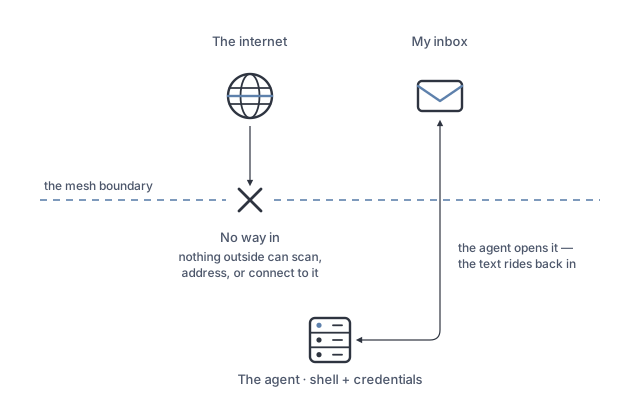
What none of that touches is the content. The moment the agent started reading my inbox, attacker-controlled text began arriving on the inside of the boundary: a message written to hijack an assistant does not need a port, it needs an assistant that reads messages. The mail scope lowers the ceiling on what a successful injection could achieve, but it does not stop one from being attempted, and the agent on the other side of it still has a shell. That is the unsolved part of this setup, and I would rather name it than let a line in a diagram imply it is handled.
The notebook’s demotion
The unexpected result is what happened to the local machine. The notebook — WSL inside Windows — did all the bootstrapping, and the rule from the start was that it must never be needed again: the remote environment depends on GitHub, on Obsidian Sync, on Claude, and on the mesh, but on no particular client device. It went from the center of my computing to one client among several, and the cheapest machine I own became the one everything else depends on being awake.
That may be one step from its final form. I am considering buying a physical server and running all of this on hardware I own, for reasons that accumulated rather than arrived at once. The $10 is only the machine, and once the assistant subscription is counted the monthly total is large enough that owning hardware changes the arithmetic. Concurrent agent sessions and an accumulating vault want more memory and disk than is economical to rent indefinitely. A box I own is a box where the vault and those OAuth tokens are not sitting on someone else’s computer. And with real hardware underneath, some of this could run on models I host rather than models I call, which would close the last dependency the setup has on anyone else’s uptime.
Meanwhile the rented box is doing the one thing a spec sheet cannot: telling me what I actually use. How much memory the sessions really need, how much disk the vault really accumulates, what sits idle. When that picture settles it becomes the configuration worth buying — and because the box is deliberately close to stateless, moving there is the same procedure as recovering from losing it: run the setup again, pointed at a server that is mine.
References
-
Obsidian. https://obsidian.md ↩
-
Anthropic. Claude Code. https://claude.com/claude-code ↩
-
Obsidian. Obsidian Sync. https://obsidian.md/sync ↩
-
Anthropic. Continue local sessions from any device with Remote Control. Claude Code documentation. https://code.claude.com/docs/en/remote-control ↩
-
Karpathy, A. LLM wiki spec. GitHub Gist. https://gist.github.com/karpathy/442a6bf555914893e9891c11519de94f ↩
-
Hetzner. Hetzner Cloud. https://www.hetzner.com/cloud/ ↩
-
Tailscale. How Tailscale works. https://tailscale.com/blog/how-tailscale-works ↩
-
Winstein, K. & Balakrishnan, H. Mosh: the mobile shell. https://mosh.org ↩
-
tmux: a terminal multiplexer. GitHub. https://github.com/tmux/tmux/wiki ↩
-
Obsidian. obsidian-headless: official headless client for Obsidian Sync. GitHub. https://github.com/obsidianmd/obsidian-headless ↩
-
Blink Shell. https://blink.sh ↩
-
Anthropic. Introducing Agent Skills. https://claude.com/blog/skills ↩
-
Anthropic. Introducing the Model Context Protocol. (2024). https://www.anthropic.com/news/model-context-protocol ↩
-
Anki. Anki sync server. https://docs.ankiweb.net/sync-server.html ↩
-
Health Auto Export. https://www.healthyapps.dev ↩
-
OpenClaw. Your own personal AI assistant. https://openclaw.ai ↩
-
Bitsight. OpenClaw Security: Risks of Exposed AI Agents Explained. (2026). https://www.bitsight.com/blog/openclaw-ai-security-risks-exposed-instances ↩
-
The Hacker News. OpenClaw AI Agent Flaws Could Enable Prompt Injection and Data Exfiltration. (2026). https://thehackernews.com/2026/03/openclaw-ai-agent-flaws-could-enable.html ↩